
KimP0ssible Autosplitter uses real-time OCR to read on-screen text from your game and automatically trigger splits in your speedrun timer. Originally built for Tom Clancy's The Division 2 (which has no native autosplitter support), it now works with any game that displays text you can match against — just create an XML profile and go.
Created by @KimP0ssible — thanks to @Summy_the_Dummy, @Bazookas and @Gast for helping through the process.
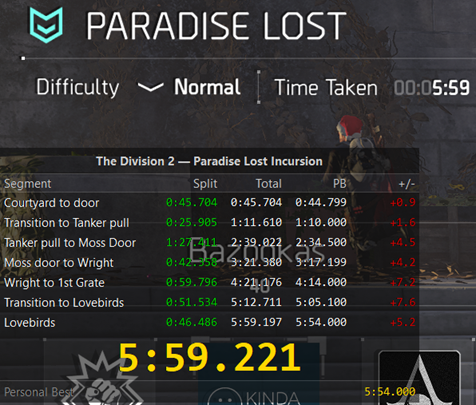
Features
🎮 OCR Screen Reading
Captures a region of your screen and performs character recognition to match keywords for each split segment. Powered by RapidOCR with PaddleOCR's PP-OCRv5 English recognition models for high accuracy on stylised game fonts.
🔃 Auto-Update
Checks for new versions at startup and offers a one-click update. Downloads and installs the latest release automatically — no manual re-downloading required.
🔗 LiveSplit Integration
Connects directly to LiveSplit Server (TCP) to send split, start, and reset commands in real time. Enabled by default — works alongside your existing LiveSplit layout.
📄 XML Profiles
Each game/mission is a standalone XML config file. Create, edit, and share profiles easily. Multiple keyword variants per segment for fuzzy matching.
🚀 RapidOCR (PaddleOCR)
Bundled PP-OCRv3 detection + PP-OCRv5 English recognition via ONNX Runtime (CPU). 88% accuracy at ~40–65 ms per inference on our Division 2 + Lincoln Memorial test corpus. Models ship with the app; no downloads or GPU required.
🎬 Game Overlay
Borderless always-on-top overlay mirrors your split table and timer directly over the game. Draggable, auto-sized, with position saved per profile. Toggle via the Overlay checkbox.
🕐 Frame-Accurate Timing
When the OCR interval fires, the engine retries up to a configurable number of buffered frames (newest first, max target FPS minus 1) until one triggers a keyword match. The split timestamp comes from the matching frame, not the current time — giving you the most accurate timing of when the text actually appeared on screen.
⚡ Native C++ Performance
Written entirely in C++20 with the Win32 API — no Electron, no Python, no runtime overhead. Near-zero CPU usage between OCR frames and an instant startup. OCR runs at 1 Hz by default; the rest of the app stays out of your game's way.
System Requirements
| Component | Requirement |
|---|---|
| OS | Windows 10 or 11 (64-bit) |
| OCR | RapidOCR (CPU, models bundled, ~40–65 ms per inference) — no GPU required |
| Display | Any resolution and DPI scaling (capture region is configurable) |
| Runtime | Microsoft Visual C++ 2015–2022 Redistributable (usually already present on Windows 10/11). All other dependencies bundled; package is ~28 MB zipped. |
Read the full documentation → for setup instructions, settings reference, XML profile format, hotkeys, and troubleshooting.
Changelog
v1.3.7 — May 14, 2026
- Run timer matches the last segment total — when a run completes, the big gold timer is now snapped to the same total time shown in the last segment’s Total column. Previously the on-screen value could trail by a few tens of milliseconds because the timer repainted on its own 20 Hz tick and froze on whichever paint landed before the run-complete signal.
v1.3.6 — May 11, 2026
- Profile Editor: edit PB times per segment — the per-segment dialog now exposes a PB field alongside the existing pte field. Type a time like
1:13.456(or plain seconds like73.456), or leave it blank to clear the PB for that segment. Previously you had to hand-edit the XML to set or change PB times before a first complete run. - Profile Editor: pte and PB shown as M:SS.mmm — both fields are now rendered in the same
M:SS.mmmform everywhere in the editor (segments table and per-segment dialog), matching how PB times are displayed in the main app. The XML still stores pte as integer seconds (e.g.pte="240") and PB as decimal seconds.
v1.3.5 — May 10, 2026
- New: single-phase start trigger —
<StartTrigger>no longer requires<From>entries. Leave the From list empty in your profile and the timer starts on the first OCR text containing any<To>keyword. Profiles with<From>keywords keep the existing two-phase behaviour (any From, then any To). Use single-phase only when your<To>text is unique to the run-start moment — if it can appear in pre-run UI (mission select, replay menus), keep<From>populated to avoid early triggers. - Edit button now opens the bundled Profile Editor — clicking Edit on a profile (or auto-opening a freshly-created one from New) launches
ProfileEditor.exewith the file pre-loaded, instead of Notepad++ / Notepad. You get the dark-themed authoring UI, live OCR preview, drag-to-select region, and Copy-OCR keyword editing for every profile, not just newly authored ones.
v1.3.4 — May 9, 2026
- New: Profile Editor — live OCR preview — the editor’s Capture / OCR section now runs OCR continuously at 1 Hz against the configured region. A new Set Region button next to the L/T/R/B fields opens the same drag-to-select calibration overlay the main app uses (S to save, Q to cancel), and an OCR output bar below it shows what the engine is reading along with inference time. Switching the Language combo (en ↔ zh-CN) re-initialises the engine on the spot, so you can verify a Chinese profile’s region without launching the main app.
- New: “Copy OCR” buttons in keyword editing — the segment editor and both Start Trigger keyword lists (From / To) gained a
Copy OCRbutton. Click it and the keyword prompt opens pre-filled with the editor’s latest recognised text so you can trim it before committing. - New: Copy button on the main app’s OCR Output panel — copies the currently displayed recognised text to the clipboard.
- Fixed: Profile Editor’s “New” button now works — previously a no-op (created disabled, no handler). Clicking New now creates a fresh profile pre-populated with sensible Capture / OCR defaults.
- Polish — the editor title bar now shows the app version (e.g.
AutoSplitter Profile Editor v1.3.4); profile filenames starting with a digit sort ahead of alphabetic ones in the dropdown; the bundled example profiles are renamed toexample_paradise_lost.xml/example_lincoln_memorial.xmlso they’re easier to tell apart from your own files.
v1.3.3 — May 8, 2026
- Fixed: Simplified Chinese OCR works in packaged releases — v1.3.0 and v1.3.1 advertised
language="zh-CN"support, but the installers shipped without the Chinese model files, so loading a Chinese profile produced no OCR output. v1.3.3 ships the full model set and adds a build-time check so this can’t recur. Thanks to @Copeium for the fix.
v1.3.2 — May 8, 2026
- Profile Editor: window auto-fits the segments table — the editor window now grows when you load a profile with more segments and shrinks back when you remove them, so there’s never empty space below the segments list and the bottom edge can’t be dragged over the table. Empty / new profiles default to 3 visible rows.
- Profile Editor: PB column instead of Final — the segments table now shows each segment’s personal-best cumulative time (e.g.
2:34.500) at a glance instead of just a Yes/No flag for the final segment. The last segment is now automatically marked as final on Save, so the manual checkbox is gone. - Profile Editor: assorted polish — section headings (“Capture / OCR”, “Start Trigger”, “Segments”) no longer clip the descenders on letters like g and p; the Fry icon now appears in the title bar and Alt-Tab; horizontal and vertical scrollbars no longer flicker into view on the segments table; an unused gap on the right edge of the table is gone.
v1.3.1 — May 8, 2026
- New: Profile Editor — a standalone GUI tool (
ProfileEditor.exe) for authoring and editing profile XML files. Open an existing profile, edit segments, keywords, OCR settings and start triggers in a dark-themed form, then Save / Save As back to disk. No more hand-editing XML in Notepad. Ships next toAutoSplitter.exein the release folder. - New: Simplified Chinese OCR — set
language="zh-CN"on the<OCR>element in your profile to switch the recogniser from English to Chinese. Useful for Chinese-language game UIs. English remains the default; thelanguageattribute is also editable from the new Profile Editor.
v1.2.3 — May 4, 2026
- Fixed: manual split key didn’t fire when a modifier was held — if your manual split was bound to a keyboard key (e.g.
-) and you happened to be holding Shift, Ctrl, or Alt, the press was silently ignored. The key now triggers a split regardless of which modifiers are down. - Fixed: game overlay could appear visually “squashed” — when the main window moved between monitors with different display scaling (or when Windows scaling % changed at runtime), the overlay’s row heights and font sizes could fall out of sync, producing tightly compressed rows where text barely fit. The overlay now tracks its own monitor DPI independently and stays correctly proportioned.
v1.2.2 — April 28, 2026
- RapidOCR is now the only OCR engine — the Windows.Media.Ocr fallback has been removed. RapidOCR has been stable at 88% accuracy since v1.1.0 and the second engine added complexity without improving anything for end users. Profiles still containing
engine="windows"parse fine — the attribute is silently ignored. - OCR initialized at app launch instead of per-run — the OCR engine now loads once when AutoSplitter starts, not every time you press F9. Removes the ~1–2 second hitch at the start of each run, and surfaces any model-loading problem immediately at launch (with a clear error dialog) instead of silently degrading to a slower engine.
- Fatal-on-failure OCR init — if the RapidOCR models can’t load (missing files, broken install, etc.), the app now shows an error dialog and exits cleanly rather than running with no working OCR. The error message names the exact reason and tells you where to look.
v1.2.1 — April 24, 2026
- Fixed:
ptegate could be bypassed at run start — in v1.2.0, the prevent-trigger gate only checked the immediate next segment, so a late-run segment with shared keywords (e.g. Paradise Lost’s Lovebirds matching normal/hard/heroic) could still false-trigger on the difficulty-select screen at the very start of a run. The gate is now enforced for every segment the keyword scan considers, sopte="N"reliably blocks matches for N seconds after the run starts.
v1.2.0 — April 22, 2026
- Per-segment
ptegate — addpte="N"to a<Segment>in your profile XML to stop OCR from even attempting that segment until N seconds have elapsed since the run started. Useful for final segments whose keyword can match common words (normal, hard, etc.) that also appear on the difficulty-select screen at the start of a run. Paradise Lost ships withpte="240"on the Lovebirds segment. - Profile upgrades never touch your content — the profile version upgrade now only appends attributes you don’t have yet. Segments you’ve deleted stay deleted, keywords you’ve tuned stay tuned, custom FPS / OCR region / thresholds stay as you set them. Only genuinely-new shipped attributes (like
pte) get added.
v1.1.0 — April 20, 2026
- RapidOCR is the new default engine — PP-OCRv3 detection + PP-OCRv5 English recognition running via ONNX Runtime on CPU. Benchmark on the Division 2 + Lincoln Memorial image corpus: 88% accuracy at ~55 ms per inference, up from 60% at ~150 ms with Windows OCR. Much better on stylised fonts (fewer Secure → Serre-style misreads). Models ship with the app; no downloads or GPU required.
- Per-profile engine selection — choose which OCR engine each profile uses via
<OCR engine="rapidocr"/>orengine="windows". Windows OCR stays available as an explicit choice and as an automatic fallback if RapidOCR ever fails to initialize. - Fuzzy matcher handles dropped spaces — OCR sometimes glues adjacent words together (
Follow theTunnel,theLincoln Memorial). The keyword matcher now retries with whitespace stripped at the same threshold, catching these cases without loosening the false-positive guard. - OCR preview stays on one line — multi-line recognition output is flattened to a single line in the status panel, so long text doesn’t wrap awkwardly. The text passed to the state machine is unchanged.
- Profile upgrades preserve your custom
<Keyword>entries — if you tweaked keywords to match your exact OCR output, they no longer get silently overwritten when a shipped profile is updated. New segments still flow through from the shipped profile. - Lincoln Memorial profile bundled as a second built-in Division 2 profile.
- Package size — ~28 MB zipped (up from ~4 MB), due to the bundled ONNX runtime and OCR model files. Uncompressed install ~52 MB. The trade-off buys +28 accuracy points and 2× faster OCR.
v1.0.2 — April 14, 2026
- 3 new OCR preprocessing passes — added gamma correction on color (darkens backgrounds while keeping white text bright), LAB color space CLAHE (perceptual contrast enhancement preserving color), and red channel + CLAHE (improves text detection on cool-toned blue/purple backgrounds). Total preprocessing passes increased from 12 to 15.
- Patch version detection in updater — the auto-updater now correctly compares patch versions (e.g., v1.0.0 vs v1.0.1). Previously only major.minor was compared, so patch releases were invisible to the updater.
v1.0.1 — April 14, 2026
- New OCR preprocessing pass — added brightness range stretching that amplifies subtle contrast between white text with shadow and bright backgrounds. Improves detection of faded objective text on sandy, blue, and other bright in-game scenes.
v1.0.0 — April 13, 2026
- General Availability release — AutoSplitter is out of beta! All features are stable and production-ready.
v0.77-beta — April 7, 2026
- Overlay background opacity — a new slider next to the Overlay checkbox controls background transparency (0–100%, default 80%). Text stays fully solid while backgrounds become see-through, giving better situational awareness during gameplay.
v0.76-beta — April 2, 2026
- Per-profile PB protection — a new PB Prot(s) setting (default 120s) prevents saving suspiciously fast runs. If a completed run beats the existing PB by more than this threshold, the save prompt is suppressed — catching resets and incomplete runs that trigger the final segment early. Configurable per profile in the XML and settings UI.
- Configurable OCR frame retries — a new Retries setting controls how many frames back the OCR engine searches when no keyword match is found on the newest frame. Default is 3, maximum is always
targetFps − 1. Saved per profile in the XML. - New profile dialog fix — the “New” profile file dialog now always opens in the
profiles/folder, even when Windows remembers a different folder from a previous session. - English-only OCR — removed the language dropdown from settings. OCR is now hardcoded to English (en-US). Existing
languageattributes in profile XML files are silently ignored.
v0.75-beta — April 2, 2026
- PB sanity check — if a completed run is more than 2 minutes faster than the existing PB, the save prompt is suppressed — this catches resets and incomplete runs that trigger the final segment early.
v0.74-beta — April 2, 2026
- Cloudflare cache bypass — the web server now sends
Cache-Control: no-storeheaders forautosplitter.zipandversion.json, preventing Cloudflare from serving stale cached versions during auto-updates. - Changelog backslash fix — fixed trailing backslashes appearing in the update dialog’s “What’s new” section caused by double-escaped newlines in
version.json.
v0.73-beta — April 1, 2026
- Consistent split timing — fixed a discrepancy where the Split and Total columns showed slightly different times for the first segment. Both now use frame-capture timestamps consistently instead of mixing two time sources.
- Updater staging cleanup — the Updater now cleans the staging directory before extraction, preventing stale files from previous failed updates from being copied over.
v0.72-beta — April 1, 2026
- Silent auto-updater — the update process now runs completely silently with no visible command prompt window. The Updater requests admin elevation (UAC prompt) to ensure files are properly overwritten, renames itself during update to allow self-updating, and cleans up temporary files automatically.
v0.71-beta — April 1, 2026
- Overlay auto-width — the game overlay now auto-sizes its width based on the longest segment name, preventing text truncation on profiles with long split names.
- Manual split debouncer — manual splits now share the same 5-second cooldown as OCR splits, preventing accidental rapid-fire advancement through multiple segments.
v0.7-beta — April 1, 2026
- Save Personal Best — when you complete a run faster than your current PB (or with no PB set), a dialog asks whether to save the new split times to your profile. PB times are written back to the XML and the split table updates immediately.
- Configurable split key — manual split now defaults to middle mouse button (Mouse3) instead of F6. A new “Split Key” press-to-bind button in settings lets you choose any keyboard key or mouse button (Mouse3/Mouse4/Mouse5). The F8 unsplit hotkey has been removed.
- Smart profile upgrades — profiles now carry a
profileVersionattribute. When the app ships updated profiles with new segments or keywords, your customized settings (FPS, OCR region, language, PB times, LiveSplit config, overlay position) are preserved while the new content is merged in automatically. - Update changelog in dialog — the update dialog now shows a “What’s new” section with release notes, so you know what changed before deciding to update.
- Updater Cloudflare fix — fixed
Updater.exefailing to download updates through Cloudflare-proxied servers. The same TLS 1.2+ and SSL retry logic from the version checker is now applied to the download as well. - Debug CRT fix — debug builds now use dynamic CRT (
/MDd) to match vcpkg DLLs, eliminating heap corruption assertions during development.
v0.6-beta — March 31, 2026
- Auto-updater — AutoSplitter now checks for new versions at startup by fetching
version.jsonfrom the update server. If a newer version is available, a dialog prompts you to update. Clicking “Yes” launches the bundledUpdater.exe, which downloads the latest release, extracts it over the current installation, and relaunches the app — fully automatic, no manual re-download needed. - Bundled Updater.exe — a new lightweight executable built as part of the project. Handles downloading the zip via WinHTTP, extracting via the Windows Shell API, and relaunching AutoSplitter after the parent process exits.
v0.5-beta — March 31, 2026
- Multi-pass OCR preprocessing — the OCR engine now runs 13 different preprocessing strategies per frame (grayscale, Otsu, CLAHE, fixed thresholds, inverted saturation, morphological tophat, blue channel enhancement, and more) and selects the best result via a quality scorer. This dramatically improves text recognition across varying in-game backgrounds — from dark caves to bright desert scenes. Accuracy improved from 52% to 100% on the test image suite.
- Smart editor detection — the Edit and New profile buttons now open XML files in Notepad++ (if installed) or Notepad, instead of the system default handler (which is often a web browser for .xml files). New profiles auto-open in the editor immediately after creation.
- File dialog defaults to profiles directory — the Open and New profile file dialogs now start in the
profiles/folder next to the executable instead of the Documents folder. - Dynamic split table resize — switching between profiles with different segment counts now instantly resizes the split table to fit, eliminating stale scrollbars from the previous profile.
- OCR frame retry — when the OCR interval fires, the engine now tries up to 3 frames from the capture buffer (newest first) instead of just the latest. It keeps trying older frames until one produces text that actually matches a keyword — not just any non-empty result. Split timing uses the timestamp from the matching frame for accurate timing of when the text appeared on screen.
- Debouncer fix — fixed a bug where the split debouncer would lock out for its full 5-second cooldown even when no keyword matched. The debouncer now only records a trigger after a successful state machine transition, allowing the frame retry and subsequent OCR cycles to work correctly.
v0.4-alpha — March 30, 2026
- Game overlay — new borderless always-on-top overlay window that mirrors the split table and timer directly over your game. Draggable by clicking anywhere, auto-sizes to segment count. Toggle via the Overlay checkbox in settings. Position is saved per profile in the XML.
- Configurable fuzzy match threshold — new Match% setting in the UI (default 92%) controls how strictly OCR text must match keywords. Saved per profile as
fuzzyMatchThresholdin the XML. Raised from 85% to 92% to prevent false positives where long keywords with shared prefixes matched unrelated text (e.g., "Secure the Area" falsely matching "Search the Bar"). - DPI font scaling fix — fixed an issue where settings panel controls (labels, edit boxes, checkboxes, dropdowns, buttons), split table, OCR panel, and log panel did not update their fonts when moving the window between monitors with different DPI scaling. All panels now have
updateFonts()methods called fromWM_DPICHANGED. - Overlay uses own font set — the game overlay renders with its own smaller fonts (Segoe UI 9pt, Consolas 9pt, Consolas 32pt timer) independent of the main window's theme fonts, keeping the overlay compact.
v0.3-alpha — March 30, 2026
- Clean deployment layout — all runtime DLLs (OpenCV, pugixml, image codecs) are now in a
lib/subfolder. The root deploy folder contains onlyAutoSplitter.exepluslib/andprofiles/. Total zip size: ~4.3 MB. - DPI-aware scaling — the GUI now properly scales all layout, fonts, and controls based on the monitor's DPI setting. Handles
WM_DPICHANGEDfor seamless multi-monitor support. Fixes layout issues on 125%/150%/175% display scaling. - PB column in split table — a new PB column between Total and +/- shows the personal best cumulative time for each segment, loaded from the profile's
pbattribute. Columns are now: Segment | Split | Total | PB | +/-. - Removed ONNX Runtime / CUDA dependency — the app now uses Windows.Media.Ocr exclusively. Removed ~1.9 GB of CUDA, cuDNN, and ONNX Runtime DLLs from the deployment package.
- Icon cleanup — removed the loose
Fry.icofile from builds. The app icon is already embedded in the executable via the resource file.
v0.2-alpha — March 29, 2026
- Personal Best tracking — store PB cumulative times per segment in the XML profile via the
pbattribute. A new +/- column in the split table shows real-time delta from PB (green = ahead, red = behind). - LiveSplit game time sync — sends
initgametime+setgametimebefore each split so LiveSplit records the app's accurate internal timer instead of wall-clock time (eliminates 1–2s OCR delay drift). Switch to "Compare Against → Game Time" in LiveSplit to use it. - Skipped segment handling — when the state machine jumps over segments,
skipsplitcommands are sent to LiveSplit for each skipped segment, keeping split indices in sync. - Fuzzy OCR matching — keyword matching now uses fuzzy substring matching (0.8 threshold) instead of exact substring. Tolerates 1–2 OCR misread characters per keyword while keeping false positives low.
- OCR image preprocessing — added OpenCV-based preprocessing (grayscale + Otsu threshold + upscaling) before WinRT OCR to improve recognition of stylized game fonts and text on busy backgrounds.
- Re-evaluation after splits — after a segment triggers, the OCR text is re-evaluated on the next cycle so multi-line text containing keywords for consecutive segments can trigger back-to-back splits.
- Save Settings saves everything — FPS, OCR interval, OCR region/language, and LiveSplit host/port/enabled are all persisted to the XML profile. Previously only OCR region and language were saved.
- Auto-reload on save — clicking Save Settings now automatically reloads the profile so changes take effect immediately without a manual Reload click.
- LiveSplit config in XML — new
<LiveSplit>element stores connection settings per profile (enabled, host, port). Settings persist across sessions. - Split time fix — fixed a bug where the Split column showed nonsensical times (raw QPC ticks instead of seconds). Split and Total columns now display correctly.
- Skipped segment LiveSplit sync — when the state machine jumps over segments,
skipsplitcommands are sent to LiveSplit for each skipped segment, keeping split indices in sync. - Change detection bypass in RUNNING state — OCR text is now always processed through the state machine while running, preventing missed splits when text changes gradually (e.g., new objective line appended to existing text with high similarity).
- Debouncer reset after splits — the cooldown timer resets after a successful split so consecutive segments in multi-line OCR text can trigger back-to-back without waiting for the full cooldown.
- Fuzzy matching threshold tuned to 0.85 — raised from 0.8 to reduce false positives where long keywords with shared prefixes (e.g., “Find a way into the Estate” vs “Find a way into the Courtyard”) could incorrectly match.
v0.1-alpha — March 28, 2026
- Initial release — OCR-powered autosplitter with WinRT OCR, LiveSplit TCP integration, XML profiles, global hotkeys, dark theme GUI, and DXGI desktop capture.